2. Describe the metrics, then find the key
Describe each family once
vouch asked for descriptions. Describe each family of keys once, in vouch.toml:
[metrics]
"*.acc"       = { fmt = ".1pct", better = "higher", desc = "test accuracy of {1} ({2}), mean and std over seeds" }
"*.train_acc" = { fmt = ".1pct", better = "higher", desc = "training accuracy of {1} ({2}), mean and std over seeds" }
fmt = ".1pct" prints 0.873 as 87.3%, and {1}, {2} are key segments. You
don't need to re-run anything: formats and descriptions are applied when values
are read, not when they are recorded.
Find the key you need
This opens a local page listing every value by script, then function. One click copies the LaTeX that cites it.
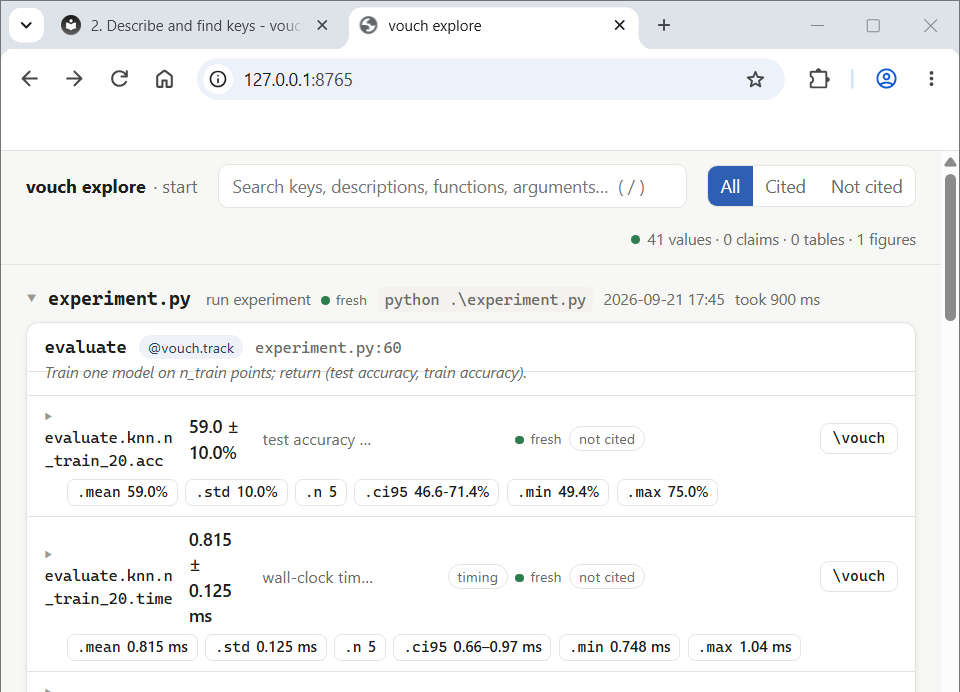
vouch explore --open: the left side lists scripts and functions; the right side
lists that function's keys, each with a button that copies its citation.
From the terminal:
$ vouch search "knn test accuracy 640"
evaluate.knn.n_train_640.acc           87.3 ± 1.4%   test accuracy of knn (n_train_640), mean and std over seeds   (experiment)
evaluate.knn.n_train_640.train_acc     87.4 ± 0.9%   training accuracy of knn (n_train_640), mean and std over se   (experiment)
...
$ vouch cite evaluate.knn.n_train_640.acc
\vouch{evaluate.knn.n_train_640.acc}         →  87.3 ± 1.4%    (fmt .1pct)
\vouch[.2pct]{evaluate.knn.n_train_640.acc}  →  87.30 ± 1.41%    (fmt .2pct)
test accuracy of knn (n_train_640), mean and std over seeds · higher is better · fresh · run experiment
subfields: .mean 87.3% · .std 1.4% · .n 5 · .ci95 85.5-89.1% · .min 85.8% · .max 89.1%
context   "Train one model on n_train points; return (test accuracy, train accuracy)."
evaluate already had a docstring (it's how knn/linear are told apart in
this tutorial's experiment.py), so vouch cite and vouch search show it
back as context: -- read fresh from the source, a sanity check that
evaluate.knn.n_train_640.acc really is what its name suggests, not a
description vouch made up.
After the first vouch build, .vouch/CATALOG.md lists every key on one line
each. It's the file to give an LLM agent that is writing the paper with you — see
LLM & agents.
Full reference: vouch explore, vouch search/vouch cite.
Next: 3. Cite and build.